
https://github.com/cherepakhin/notebook.
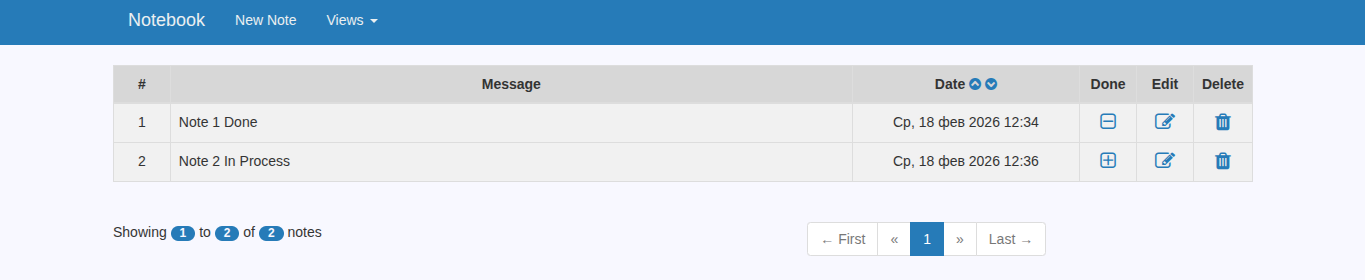
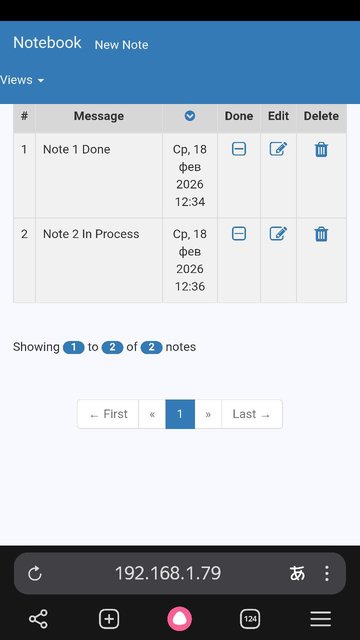
CRUD приложение использует spring-boot-starter-web и template Thymeleaf и базу данных MySQL. Данные хранятся в базе MySQL, обмен проходит с помощью query-запросов и организует фильтрацию, сортировку по значениям, регулируемую с помощью элементов управления в пользовательском интерфейсе.
- Использован template Thymeleaf (очень симпатичный Bootstrap интерфейс с доработанным css).
- Постраничная навигация.
- Редактирование записи.
- Переход по страницам.

Сборка и запуск приложения
Используется Java 8.
export JAVA_HOME=/usr/lib/jvm/java-1.8.0-openjdk-amd64
Сборка:
./mvnw clean package
Запуск:
/usr/lib/jvm/java-1.8.0-openjdk-amd64/bin/java -jar target/Notebook-0.0.1-SNAPSHOT.jar
Открыть http://127.0.0.1:8990/
Размещение на сервере Linux
Создать файл /etc/systemd/system/notebook.service:
[Unit]
Description=notebook
Wants=network-online.target
After=network-online.target
[Service]
Type=simple
User=vasi
Group=vasi
ExecReload=/bin/kill -HUP
ExecStart=/usr/lib/jvm/java-1.8.0-openjdk-amd64/bin/java -jar target/notebook-0.0.1.jar
SyslogIdentifier=notebook
StandardOutput=file:/var/log/notebook.stdout.log
StandardError=file:/var/log/notebook.stderr.log
Restart=always
[Install]
WantedBy=multi-user.target
Перечитать сервисы:
systemctl daemon-reload
И запустить:
systemctl start notebook
Подключить к HTTPS через Apache2:
/etc/apache2/sites-enabled# cat 000-default-le-ssl.conf
<IfModule mod_ssl.c>
    <VirtualHost *:443>
	# The ServerName directive sets the request scheme, hostname and port that
	# the server uses to identify itself. This is used when creating
	# redirection URLs. In the context of virtual hosts, the ServerName
	# specifies what hostname must appear in the request's Host: header to
	# match this virtual host. For the default virtual host (this file) this
	# value is not decisive as it is used as a last resort host regardless.
	# However, you must set it for any further virtual host explicitly.
	ServerName v.perm.ru

	ServerAdmin Адрес электронной почты защищен от спам-ботов. Для просмотра адреса в браузере должен быть включен Javascript.
	DocumentRoot /var/www/main/

	# Available loglevels: trace8, ..., trace1, debug, info, notice, warn,
	# error, crit, alert, emerg.
	# It is also possible to configure the loglevel for particular
	# modules, e.g.
	LogLevel debug

	ErrorLog ${APACHE_LOG_DIR}/error.log
	CustomLog ${APACHE_LOG_DIR}/access.log combined

	# For most configuration files from conf-available/, which are
	# enabled or disabled at a global level, it is possible to
	# include a line for only one particular virtual host. For example the
	# following line enables the CGI configuration for this host only
	# after it has been globally disabled with "a2disconf".
	#Include conf-available/serve-cgi-bin.conf

	ServerName v.perm.ru
	SSLEngine on

	#SSLProxyEngine On
	#ProxyPreserveHost on
	#ProxyRequests off

	SSLCertificateFile /etc/letsencrypt/live/v.perm.ru/cert.pem
	SSLCertificateChainFile /etc/letsencrypt/live/v.perm.ru/fullchain.pem
	SSLCertificateKeyFile /etc/letsencrypt/live/v.perm.ru/privkey.pem
	SSLCACertificateFile /etc/letsencrypt/live/v.perm.ru/chain.pem
	Include /etc/letsencrypt/options-ssl-apache.conf


	# Проксирование запросов на Spring Boot (работает по HTTP на localhost:8088)
	ProxyPreserveHost On
	# hr_admin

	# Передача информации о протоколе (важно для Spring Boot)
	RequestHeader set X-Forwarded-Proto https

	# Дополнительные настройки безопасности и логирования
	Protocols h2 http/1.1
	SSLProtocol all -SSLv3 -TLSv1 -TLSv1.1
	ErrorLog ${APACHE_LOG_DIR}/spring-proxy-error.log
	CustomLog ${APACHE_LOG_DIR}/spring-proxy.log combined

	#Notebook
	ProxyPass        /notebook http://192.168.1.20:8990/notebook
	ProxyPassReverse /notebook http://192.168.1.20:8990/notebook

	ProxyPreserveHost On
    </VirtualHost>
</IfModule>
Результат https://v.perm.ru/notebook.