JBang — это CLI - инструмент, который позволяет запускать Java-код прямо из КОМАНДНОЙ СТРОКИ, без сложной структуры проекта, файлов сборки (Maven/Gradle) и явного объявления pom.xml.
Ссылки:
- https://github.com/jbangdev/jbang
- https://www.baeldung.com/jbang-guide
- https://github.com/dmakariev/examples.git
Инициализация и запуск Hello World в консоли с помощью команды `init`:
jbang init --template=cli hello.java
Результат:
[jbang] File initialized. You can now run it with 'jbang hello.java'
or edit it using 'jbang edit --open=[editor] hello.java' where [editor] is your editor or IDE,
e.g. 'eclipse'.
If your IDE supports JBang, you can edit the directory instead: 'jbang edit . hello.java'.
See https://jbang.dev/ide
или
$ jbang init hello.java
$ ls
hello.java
$ cat hello.java
///usr/bin/env jbang "$0" "$@" ; exit $?
//DEPS info.picocli:picocli:4.6.3

import picocli.CommandLine;
import picocli.CommandLine.Command;
import picocli.CommandLine.Parameters;

import java.util.concurrent.Callable;

@Command(name = "hello", mixinStandardHelpOptions = true, version = "hello 0.1",
description = "hello made with jbang")
class hello implements Callable {

    @Parameters(index = "0", description = "The greeting to print", defaultValue = "World!")
    private String greeting;

    public static void main(String... args) {
    int exitCode = new CommandLine(new hello()).execute(args);
    System.exit(exitCode);
    }

    @Override
    public Integer call() throws Exception { // your business logic goes here...
    System.out.println(System.getProperty("java.version"));
    System.out.println("Hello " + greeting);
    return 0;
    }
}
Запуск:
$ jbang hello.java Max!
Результат:
[jbang] Building jar for hello.java...
21
Hello Max!
Из https://github.com/dmakariev/examples.git
Для Kotlin
jbang init -t hello.kt myhello.kt
Для Spring Boot
Генерация:
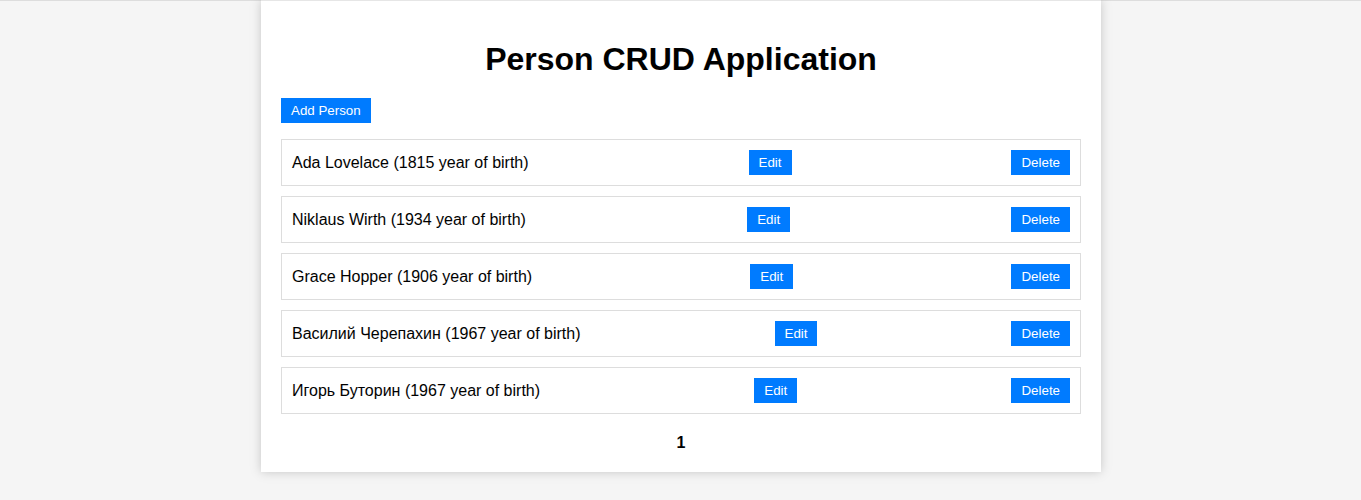
jbang -Dspring.datasource.url=jdbc:h2:mem:person-db springbootJpaVue.java
spring_boot_jpa_vue/run_springbootJpaVue.sh
Объявление maven зависимостей и т.п. делается в запускаемом файле:
//usr/bin/env jbang "$0" "$@" ; exit $?
//JAVA 21
//DEPS org.springframework.boot:spring-boot-dependencies:3.3.0@pom
//DEPS org.springframework.boot:spring-boot-starter-web
//DEPS org.springframework.boot:spring-boot-starter-data-jpa
//DEPS org.springframework.boot:spring-boot-starter-actuator
//DEPS com.h2database:h2
//DEPS org.postgresql:postgresql
//DEPS org.projectlombok:lombok
//DEPS org.springdoc:springdoc-openapi-starter-webmvc-ui:2.5.0
//DEPS org.slf4j:slf4j-simple

//JAVA_OPTIONS -Dserver.port=8080
//JAVA_OPTIONS -Dspring.datasource.url=jdbc:h2:mem:person-db;MODE=PostgreSQL;
//JAVA_OPTIONS -Dspring.h2.console.enabled=true -Dspring.h2.console.settings.web-allow-others=true
//JAVA_OPTIONS -Dmanagement.endpoints.web.exposure.include=health,env,loggers
//FILES META-INF/resources/index.html=index-fetch.html

//REPOS mavencentral,sb_snapshot=https://repo.spring.io/snapshot,sb_milestone=https://repo.spring.io/milestone
Создание Spring Boot исполняемого файла:
jbang export fatjar springbootJpaVue.java
Результат:
spring_boot_jpa_vue/springbootJpaVue.java
Запуск:
spring_boot_jpa_vue/run_springbootJpaVue.sh:
jbang -Dspring.datasource.url=jdbc:h2:mem:person-db springbootJpaVue.java